
TGFC俱乐部>>完全数码讨论区>>
- 刷新/显图/登录/注册/WEB
标题:nAtiveCn2.3出来了,支持简体中文五笔字型输入
时间:07-10-30 03:06
作者:jun4rui
Developed by Gary, IczFirz.
Special thanks to Laoren (weSms作者), Suiduck, Kenol, Mike_abc, Imagination
熱心捐款: Paypal Donation || 淘寶網捐款100 || 淘寶網捐款10http://chat.iphone.org.hk/chat/images/smilies/money.gif
將用作維持iPhone.org.hk Server的運作之用.
必定要係iPhone Firmware 1.1.1方可使用
安裝方法 一 (NativeCn v2.30):
0. 必先要有Installer (冇乜可能會冇啦...)
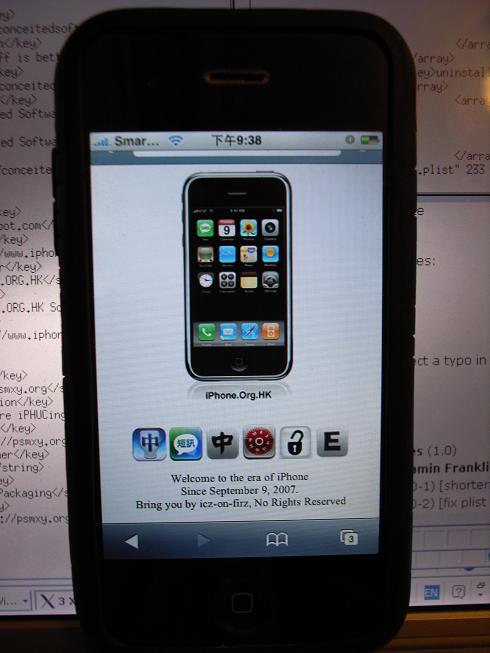
1. 哎瘋用safari進入頭版 http://www.iphone.org.hk
2. 按http://www.iphone.org.hk/Applications/NativeCn.app/icon.png
.. 回應Yes進行plist安裝
3. 在home主網進入Installer > Sources
4. 睇到一個空白Uncategorized項目..
5. 按refresh.. 直至空白項目變成Happy Chinese iPhone!
6. 按下方Install
7. 見到Localiztion
8. 內裡見到NativeCn.. 裝左佢..
http://www.iphone.org.hk/attach/snc1.JPG - snc8.JPG << 自己睇下啦
安裝方法 二 (NativeCn v2.30):
0. 必先要有Installer Version 3或以上 (如果是2.0, Installer應該會叫你upgrade上最新版本的)
1. 於iPhone 上執行 Installer app
2. 在Installer, 按畫面右下角的 "Sources" icon
3. 進入 "Sources" 分頁後, 按畫面右上角的 "Edit" 按鈕, 再按左上角的 "Add" 按鈕.
5. 加入http://www.iphone.org.hk/repository.plist
6. 在Installer, 按畫面右下角的 "Install" icon
3. 係Install分頁, 你應該會見到多了一個Localization 的分類
4. 內裡見到NativeCn.. 裝了他....
安裝方法 三 (NativeCn v2.30):
1. 下載程式包 NativeCn 2.30
2. 用SSH/SCP (WinSCP) 把程式包上的 NativeCn.app 抄去 iPhone上的 /Applications/
3. 用 SSH (Putty) 連上 iPhone, 鍵入以下Command:
cd /Applications/NativeCn.app
chmod +x ncn
4. 重啟 iPhone or 重啟 Springboard
** NativeCn - iPod Touch適用!!
版本記錄:
2.30 - 加入 簡體五筆 輸入法!!! 由於未能得到台灣行易公司授權免費使用,
以後的版本將會除去 繁體嘸蝦咪 輸入法, 直至另行通知. http://www.iphone.org.hk/ch/images/smiles/smile_sad.gif
2.20 - 解決各輸入法漏字問題, 加入 Tips 分頁, 請務必看一看Tips 分頁!!
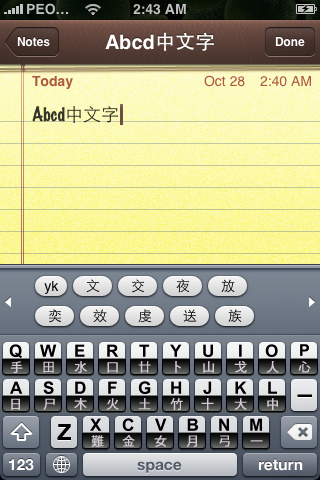
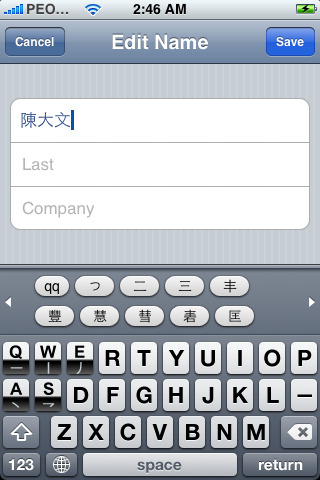
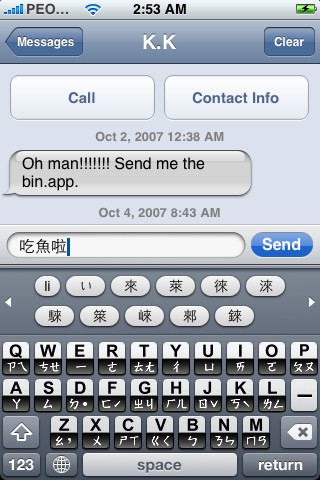
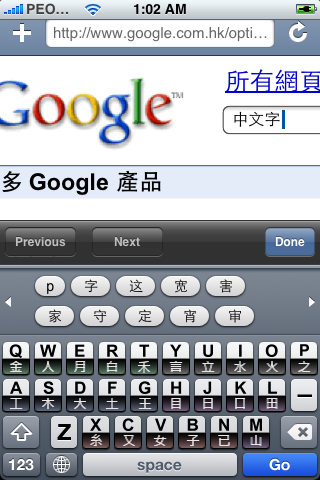
2.10 - 完美Keyboard graphics 倉頡,速成,筆順,台灣注音!!! (見下圖), thanks Mike_abc and Imagination
2.00 - 除蟲, 加入繁體筆順, 台灣注音輸入法, 醜陋中文鍵盤(有待美化)... http://www.iphone.org.hk/ch/images/smiles/smile_big.gif
1.20 - 加入台灣嘸蝦米輸入法 :[http://www.iphone.org.hk/ch/images/smiles/smile_disapprove.gif
http://www.iphone.org.hk/ch/images/smiles/smile.gif
]
1.01 - 解決 簡體拼音 及 廣東話 嚴重漏字問題
1.00 - Initial Release
程式介紹:
Firmware 1.1.1 內建了外語輸入引擎, 只是給Apple disable罷了.
NativeCn 的功能是把外語輸入引擎啟動, 及將中文輸入法套於引擎之上.
由於是iPhone內建的外語輸入引擎, 所以穩定性, 方便性, 美觀性都是完美的.
NativeCh 將會令iPhone/iPod Touch.... Perfect http://www.iphone.org.hk/ch/images/smiles/smile_big.gif
希望各位在enjoy NativeCh 的同時, 慷慨解囊, 多多益善, 少少無拘.
雖知道, iPhone上的輸入法資料庫是極為複雜, 我們不知花了多少晚, 才可把的結構解讀出來
Firmware 1.1.1 比 1.0.2 完美, 已是不爭的事實, AnySIM, Install.app, SummerBoard, iBrickr 等亦朝著 1.1.1 方向行....
所以大家還是upgrade 上 1.1.1 吧.
To be list:
- 睇 HEROS season 1
- 加入繁/簡體, 系統中文化功能.
由於使用系統內建輸入模塊, 有自動學習聯想字... 意想不到的強!!
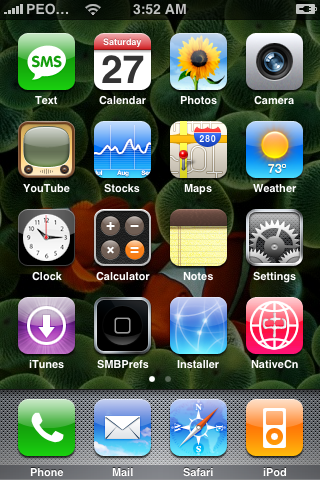
http://www.iphone.org.hk/attach/9105-NativeCn200a-embed.png
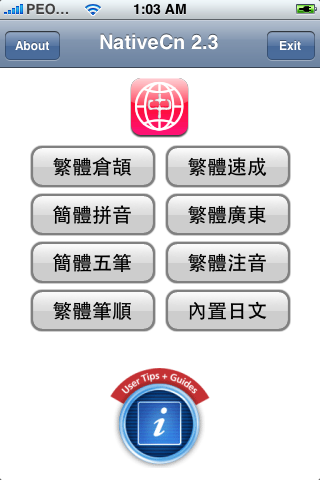
http://www.iphone.org.hk/attach/9936-NativeCn230a-embed.png
http://www.iphone.org.hk/attach/9399-NativeCn210b-embed.png
http://www.iphone.org.hk/attach/9400-NativeCn210c.png
http://www.iphone.org.hk/attach/9401-NativeCn210d-embed.png
http://www.iphone.org.hk/attach/9937-NativeCn230b-embed.png
Special thanks to Laoren (weSms作者), Suiduck, Kenol, Mike_abc, Imagination
熱心捐款: Paypal Donation || 淘寶網捐款100 || 淘寶網捐款10http://chat.iphone.org.hk/chat/images/smilies/money.gif

將用作維持iPhone.org.hk Server的運作之用.
必定要係iPhone Firmware 1.1.1方可使用
安裝方法 一 (NativeCn v2.30):
0. 必先要有Installer (冇乜可能會冇啦...)
1. 哎瘋用safari進入頭版 http://www.iphone.org.hk
2. 按http://www.iphone.org.hk/Applications/NativeCn.app/icon.png

.. 回應Yes進行plist安裝
3. 在home主網進入Installer > Sources
4. 睇到一個空白Uncategorized項目..
5. 按refresh.. 直至空白項目變成Happy Chinese iPhone!
6. 按下方Install
7. 見到Localiztion
8. 內裡見到NativeCn.. 裝左佢..
http://www.iphone.org.hk/attach/snc1.JPG - snc8.JPG << 自己睇下啦
安裝方法 二 (NativeCn v2.30):
0. 必先要有Installer Version 3或以上 (如果是2.0, Installer應該會叫你upgrade上最新版本的)
1. 於iPhone 上執行 Installer app
2. 在Installer, 按畫面右下角的 "Sources" icon
3. 進入 "Sources" 分頁後, 按畫面右上角的 "Edit" 按鈕, 再按左上角的 "Add" 按鈕.
5. 加入http://www.iphone.org.hk/repository.plist
6. 在Installer, 按畫面右下角的 "Install" icon
3. 係Install分頁, 你應該會見到多了一個Localization 的分類
4. 內裡見到NativeCn.. 裝了他....
安裝方法 三 (NativeCn v2.30):
1. 下載程式包 NativeCn 2.30
2. 用SSH/SCP (WinSCP) 把程式包上的 NativeCn.app 抄去 iPhone上的 /Applications/
3. 用 SSH (Putty) 連上 iPhone, 鍵入以下Command:
cd /Applications/NativeCn.app
chmod +x ncn
4. 重啟 iPhone or 重啟 Springboard
** NativeCn - iPod Touch適用!!
版本記錄:
2.30 - 加入 簡體五筆 輸入法!!! 由於未能得到台灣行易公司授權免費使用,
以後的版本將會除去 繁體嘸蝦咪 輸入法, 直至另行通知. http://www.iphone.org.hk/ch/images/smiles/smile_sad.gif

2.20 - 解決各輸入法漏字問題, 加入 Tips 分頁, 請務必看一看Tips 分頁!!
2.10 - 完美Keyboard graphics 倉頡,速成,筆順,台灣注音!!! (見下圖), thanks Mike_abc and Imagination
2.00 - 除蟲, 加入繁體筆順, 台灣注音輸入法, 醜陋中文鍵盤(有待美化)... http://www.iphone.org.hk/ch/images/smiles/smile_big.gif

1.20 - 加入台灣嘸蝦米輸入法 :[http://www.iphone.org.hk/ch/images/smiles/smile_disapprove.gif

http://www.iphone.org.hk/ch/images/smiles/smile.gif

]
1.01 - 解決 簡體拼音 及 廣東話 嚴重漏字問題
1.00 - Initial Release
程式介紹:
Firmware 1.1.1 內建了外語輸入引擎, 只是給Apple disable罷了.
NativeCn 的功能是把外語輸入引擎啟動, 及將中文輸入法套於引擎之上.
由於是iPhone內建的外語輸入引擎, 所以穩定性, 方便性, 美觀性都是完美的.
NativeCh 將會令iPhone/iPod Touch.... Perfect http://www.iphone.org.hk/ch/images/smiles/smile_big.gif
希望各位在enjoy NativeCh 的同時, 慷慨解囊, 多多益善, 少少無拘.
雖知道, iPhone上的輸入法資料庫是極為複雜, 我們不知花了多少晚, 才可把的結構解讀出來
Firmware 1.1.1 比 1.0.2 完美, 已是不爭的事實, AnySIM, Install.app, SummerBoard, iBrickr 等亦朝著 1.1.1 方向行....
所以大家還是upgrade 上 1.1.1 吧.
To be list:
- 睇 HEROS season 1
- 加入繁/簡體, 系統中文化功能.
由於使用系統內建輸入模塊, 有自動學習聯想字... 意想不到的強!!
http://www.iphone.org.hk/attach/9105-NativeCn200a-embed.png
http://www.iphone.org.hk/attach/9936-NativeCn230a-embed.png
http://www.iphone.org.hk/attach/9399-NativeCn210b-embed.png
http://www.iphone.org.hk/attach/9400-NativeCn210c.png
http://www.iphone.org.hk/attach/9401-NativeCn210d-embed.png
http://www.iphone.org.hk/attach/9937-NativeCn230b-embed.png
回复列表 (6)
雖然我常用五筆,這種虛擬鍵盤我寧可用拼音——腦子完全不記得字根呵,感覺是手指記字根,手不放鍵盤上根本打不出來:D .
===================
楼上不会吧,一般五笔字型用户都是盲打的,比如偶。
===================
我是盲打呵,但純是手指條件反射式的打字.
比如上面這句話,很自然就打出來,但要是憑空問我"手指"兩個字怎麼打,按哪幾個鍵,還真是不知道.:肥雀寒:
比如上面這句話,很自然就打出來,但要是憑空問我"手指"兩個字怎麼打,按哪幾個鍵,還真是不知道.:肥雀寒:
===================
功力不够呀。。。。
===================
我的手离开键盘肯定就不会打五笔……手机打五笔还是算了吧
===================
原帖由 jiaju的马甲 于 2007-10-30 07:42 发表
我是盲打呵,但純是手指條件反射式的打字.
比如上面這句話,很自然就打出來,但要是憑空問我"手指"兩個字怎麼打,按哪幾個鍵,還真是不知道.:肥雀寒:
我是盲打呵,但純是手指條件反射式的打字.
比如上面這句話,很自然就打出來,但要是憑空問我"手指"兩個字怎麼打,按哪幾個鍵,還真是不知道.:肥雀寒:
的确是这个样子的,手机上用五笔还是算了吧
===================
[登录后才可回复]